Syncs new InvestorLift offers to Salesforce with buyer, property, and offer linking
Zapier Automation Case Study
InvestorLift Offer Processing in Salesforce
Category
Zapier Automation
Client
—
Start Date
—
Designer
Dynasty Maker
Project overview
Case study
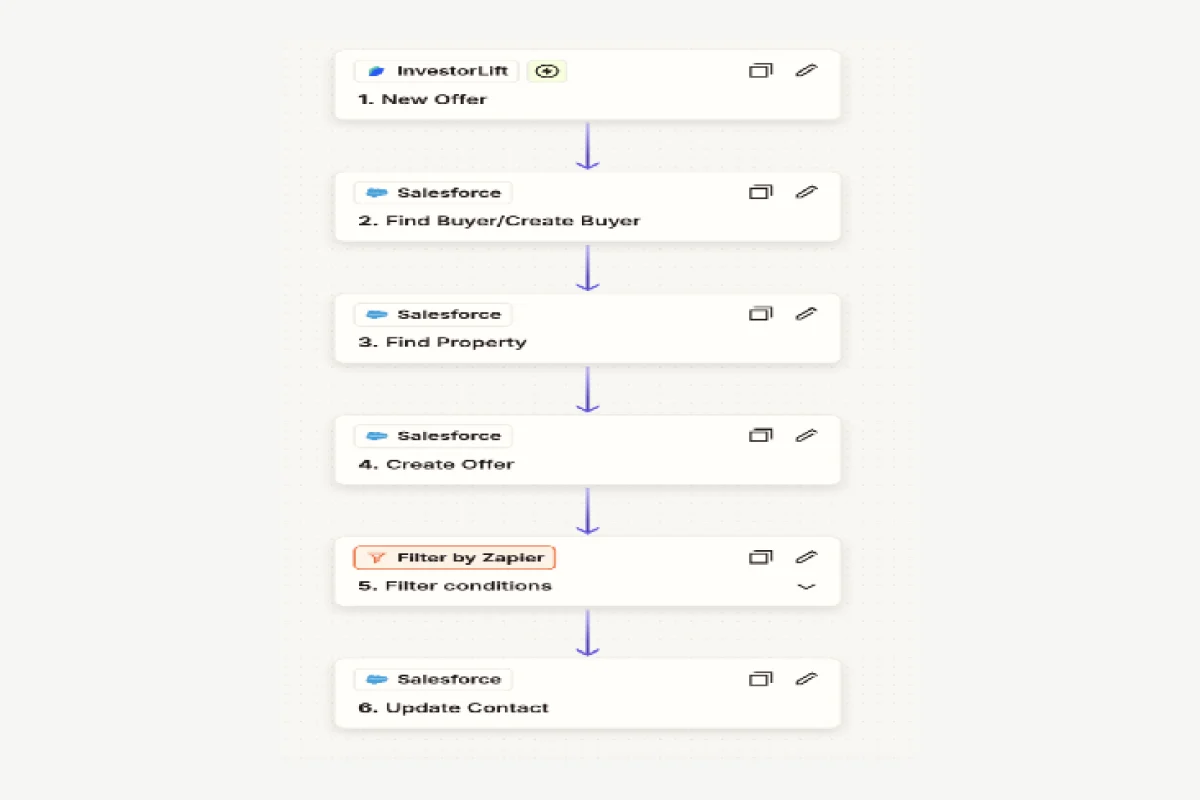
This Zapier automation workflow processes new offers from InvestorLift by managing buyer and property data in Salesforce, creating an offer record, and updating contacts based on specific conditions. It ensures that offer-related data is accurately documented in Salesforce, streamlining the real estate transaction process.
• Trigger: “New Offer” in InvestorLift starts the Zap and captures each incoming offer in real-time.
• Find Buyer / Create Buyer: Searches Salesforce for the purchaser; if none exists, creates a new Buyer record.
• Find Property: Looks up the property in Salesforce and associates it with the offer.
• Create Offer: Creates a new Offer record in Salesforce linking the Buyer and Property.
• Filter Conditions: Applies conditional logic (e.g., offer status, value thresholds) so only relevant offers proceed.
• Update Contact: Updates the Contact record in Salesforce with the latest offer details for up-to-date stakeholder visibility.
• Zero-touch offer entry in Salesforce, eliminating manual data entry.
• Contacts always reflect the latest offer status for seamless transaction management.
LET’S WORK TOGETHER
Discuss Your Project
Have a project in mind?
Tell us what you need and let’s explore the right solution for your business.